TranSkript
Overview
Section titled “Overview”TranSkript is a powerful module that generates Discord-like website transcripts of conversations. You can recreate and save conversations forever, including replies, attachments, colors, references, embeds, reactions, and much more!
Requirements
Section titled “Requirements”- Java 16 or higher
- DiSky v4.21.0 or higher
What Can Be Saved?
Section titled “What Can Be Saved?”TranSkript captures nearly every aspect of Discord messages:
- Text Content: Formatted text with bold, italic, and other Discord markdown
- Code: Code blocks and inline code snippets
- Formatting: Spoilers and quote blocks
- Media: Attachments and embedded images
- Embeds: Complete embed structures
- Reactions: Reaction emojis with their counts
- References: Referenced/replied-to messages
- Commands: Slash command invocations
- User Types: Webhook and bot messages
- Components: Buttons and other interactive elements
Visual Examples
Section titled “Visual Examples”Simple Discussion
Section titled “Simple Discussion”.png)
Simple discussion, featuring mentions, role’s colors, and a bot.
Links and Rendering
Section titled “Links and Rendering”.png)
Several links and their rendering.
Thread Creation
Section titled “Thread Creation”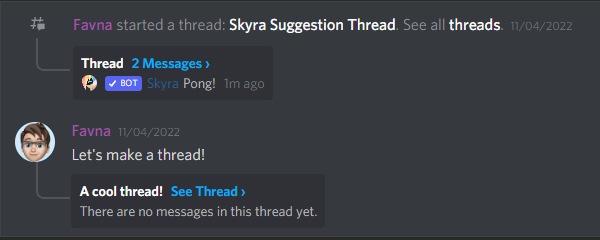
Threads/post creation.
Message Replies
Section titled “Message Replies”.png)
Replies.
Interactive Components
Section titled “Interactive Components”.png)
Buttons.
Installation
Section titled “Installation”-
Get Patreon Access
Subscribe to ItsTheSky’s Patreon to access premium modules.
-
Download TranSkript
Download the latest version from the Patreon resources page.
-
Verify Requirements
Ensure you’re running Java 16+ and DiSky v4.21.0+.
-
Install the Module
Place the JAR file in your
plugins/DiSky/modules/directory. -
Restart Your Server
Restart your server to load the module.
Basic Usage
Section titled “Basic Usage”TranSkript provides one main effect that can be used in two different contexts:
Generating from a Channel
Section titled “Generating from a Channel”Generate a transcript of the last 100 messages (Discord’s maximum) from a channel:
# Generate transcript from a channelset {_channel} to event-channel # can be any messaging channel, including DMsgenerate transcript from channel {_channel} and store it in "plugins/transcripts/chat.html"Generating from Specific Messages
Section titled “Generating from Specific Messages”If you have a specific list of messages you want to include:
# Generate transcript from specific messagesset {_messages::*} to ... # your message listgenerate transcript from messages {_messages::*} and store it in "plugins/transcripts/conversation.html"Customization Options
Section titled “Customization Options”TranSkript uses Discord’s default “airy” theme and dark mode by default. You can customize the appearance by enabling compact mode and/or light theme.
Creating Custom Options
Section titled “Creating Custom Options”# Compact mode onlyset {_opts} to new transcript options with compact mode
# Light theme onlyset {_opts} to new transcript options with light theme
# Both compact mode and light themeset {_opts} to new transcript options with compact mode and light themeApplying Options
Section titled “Applying Options”Use the options when generating transcripts:
# Create custom optionsset {_opts} to new transcript options with compact mode and light theme
# Generate transcript with custom optionsgenerate transcript from channel {_channel} with {_opts} and store it in "plugins/transcripts/chat.html"
Practical Examples
Section titled “Practical Examples”Archiving Support Tickets
Section titled “Archiving Support Tickets”Create a transcript when a support ticket is closed:
# When a ticket is closeddiscord command close:    prefixes: !    trigger:        # Check if this is a ticket channel        if {ticket::%discord id of event-channel%} is not set:            reply with "This is not a ticket channel!"            stop
        # Generate transcript        set {_opts} to new transcript options with light theme        generate transcript from channel event-channel with {_opts} and store it in "plugins/transcripts/ticket-%discord id of event-channel%.html"
        # Send confirmation        reply with "Ticket transcript saved! Closing channel in 5 seconds..."
        # Wait and close        wait 5 seconds        delete event-channel
Logging Deleted Messages
Section titled “Logging Deleted Messages”Save transcripts of channels before deletion:
# Before deleting a channelon channel delete:    # Generate a transcript for record-keeping    generate transcript from channel event-channel and store it in "plugins/transcripts/deleted-%discord id of event-channel%-%now%.html"
    # Log the deletion    send "Channel transcript saved before deletion" to console
Creating Conversation Archives
Section titled “Creating Conversation Archives”Archive important conversations for future reference:
discord command archive:    prefixes: !    roles: Moderator    trigger:        # Generate transcript        set {_timestamp} to now        set {_filename} to "plugins/transcripts/%discord id of event-channel%-%{_timestamp}%.html"
        generate transcript from channel event-channel and store it in {_filename}
        # Upload the transcript file        reply with file {_filename} with message "Here's the conversation archive!"
Exporting Specific Message Ranges
Section titled “Exporting Specific Message Ranges”Export a custom range of messages:
discord command export <integer> [<integer>]:    prefixes: !    trigger:        # arg-1 is the number of messages or start ID        # arg-2 (optional) is the end ID
        set {_limit} to arg-1        if {_limit} is greater than 100:            reply with "Can only export up to 100 messages at a time!"            stop
        # Retrieve messages from the channel        set {_messages::*} to last {_limit} messages from event-channel
        # Generate transcript        set {_opts} to new transcript options with compact mode        generate transcript from messages {_messages::*} with {_opts} and store it in "plugins/transcripts/export-%now%.html"
        reply with file "plugins/transcripts/export-%now%.html" with message "Export complete!"
Advanced Features
Section titled “Advanced Features”Combining with DiSky Events
Section titled “Combining with DiSky Events”Use TranSkript with DiSky’s message events:
# Archive conversations when specific keywords are mentionedon message received: if message contains "!archive": # Check permissions if event-member has permission administrator: # Generate and upload transcript generate transcript from channel event-channel and store it in "plugins/temp/archive.html" send file "plugins/temp/archive.html" to event-channelScheduled Archives
Section titled “Scheduled Archives”Create automatic daily archives:
# Daily archive at midnightevery day at 00:00:    loop all text channels tagged with "archive":        set {_channel} to loop-value        set {_date} to now        set {_filename} to "plugins/archives/%discord id of {_channel}%-%{_date}%.html"
        generate transcript from channel {_channel} and store it in {_filename}
Theme Comparison
Section titled “Theme Comparison”Dark Mode (Default)
Section titled “Dark Mode (Default)”The default dark theme matches Discord’s dark mode appearance, providing a familiar experience for users who prefer dark themes.
# Default dark themegenerate transcript from channel {_channel} and store it in "dark-theme.html"Light Mode
Section titled “Light Mode”Enable light theme for a brighter appearance:
# Light themeset {_opts} to new transcript options with light themegenerate transcript from channel {_channel} with {_opts} and store it in "light-theme.html"Compact Mode
Section titled “Compact Mode”Compact mode reduces spacing for a more condensed view:
# Compact modeset {_opts} to new transcript options with compact modegenerate transcript from channel {_channel} with {_opts} and store it in "compact.html"File Management
Section titled “File Management”Organizing Transcripts
Section titled “Organizing Transcripts”Create an organized folder structure:
# Organize by date and channelset {_date} to now formatted as "yyyy-MM-dd"set {_channel-name} to name of event-channelset {_folder} to "plugins/transcripts/%{_date}%/"
# Ensure folder existscreate directories {_folder}
# Generate transcript with organized pathset {_file} to "%{_folder}%%{_channel-name}%.html"generate transcript from channel event-channel and store it in {_file}
Cleaning Old Transcripts
Section titled “Cleaning Old Transcripts”Implement automatic cleanup of old transcripts:
# Clean transcripts older than 30 daysevery day at 03:00: loop files in "plugins/transcripts/": if modification date of loop-file was more than 30 days ago: delete loop-fileTroubleshooting
Section titled “Troubleshooting”Common Issues
Section titled “Common Issues”Java Version
- TranSkript requires Java 16 or higher
- Check your Java version with
/versionin console
DiSky Version
- Ensure you’re running DiSky v4.21.0 or higher
- Update DiSky if necessary
File Permissions
- Verify that your server has write permissions to the target directory
- Check that the plugins/transcripts folder exists
Missing Messages
- Remember that only the last 100 messages can be retrieved from a channel
- For specific ranges, store messages as they arrive
File Not Found Errors
Section titled “File Not Found Errors”Ensure the target directory exists:
# Create directory before savingon load: create directories "plugins/transcripts/"Large Transcripts
Section titled “Large Transcripts”For channels with many embeds or attachments:
Best Practices
Section titled “Best Practices”- Regular Archives: Archive important channels regularly to maintain conversation history
- Storage Management: Implement cleanup routines to prevent excessive disk usage
- Permissions: Only allow trusted users to generate transcripts
- File Naming: Use descriptive, timestamped filenames for easy organization
- Theme Selection: Choose themes that match your users’ preferences or your brand
Performance Considerations
Section titled “Performance Considerations”Message Limits
Section titled “Message Limits”# For performance, limit the number of messagesif arg-1 is greater than 50: reply with "Please request fewer than 50 messages for optimal performance." stop
set {_messages::*} to last arg-1 messages from event-channelgenerate transcript from messages {_messages::*} and store it in "transcript.html"Asynchronous Generation
Section titled “Asynchronous Generation”Consider offloading transcript generation:
# Inform user that generation may take timereply with "Generating transcript... This may take a moment."
# Generate transcriptgenerate transcript from channel event-channel and store it in {_file}
# Notify completionsend file {_file} to event-user with message "Transcript ready!"
Reference
Section titled “Reference”Effects
Section titled “Effects”| Effect | Description |
|---|---|
generate transcript from channel %channel% [with %-transcriptoptions%] and store it in %string% | Generate transcript from a channel’s recent messages |
generate transcript from messages %messages% [with %-transcriptoptions%] and store it in %string% | Generate transcript from specific messages |
Expressions
Section titled “Expressions”| Expression | Return Type | Description |
|---|---|---|
new transcript options with compact mode | TranscriptOptions | Create options with compact mode enabled |
new transcript options with light theme | TranscriptOptions | Create options with light theme |
new transcript options with compact mode and light theme | TranscriptOptions | Create options with both compact mode and light theme |
Support
Section titled “Support”Need help with TranSkript? Get support: