AutoMod
AutoMod is Discord’s powerful built-in moderation system that automatically filters messages, detects spam, and takes action against rule violations. With DiSky, you can create and manage AutoMod rules programmatically.
How AutoMod Works
Section titled “How AutoMod Works”AutoMod operates on a trigger-action model:
- Trigger - Something happens that matches your rule (message contains bad words, too many mentions, etc.)
- Action - AutoMod takes the configured actions (block message, send alert, timeout member, etc.)
Multiple rules can trigger simultaneously, and each rule can have multiple actions.
Rule Triggers
Section titled “Rule Triggers”AutoMod can trigger based on message content:
Keyword Filter
Section titled “Keyword Filter”Blocks messages containing specific words:
create a new automod rule and store it in {_rule}: set type of rule to (message with keyword filter "badword" named "No Bad Words")You can add multiple keywords by separating them with spaces or using multiple filter rules.
Pattern Filter (Regex)
Section titled “Pattern Filter (Regex)”Blocks messages matching a regex pattern:
create a new automod rule and store it in {_rule}: set type of rule to (message with pattern filter "m(\\d+)rb" named "Pattern Filter")This is useful for detecting variations or complex patterns like spam links.
Mention Spam Filter
Section titled “Mention Spam Filter”Blocks messages with too many mentions:
create a new automod rule and store it in {_rule}: set type of rule to (message with mention filter 5 named "No Mention Spam")This prevents users from spamming by mentioning many people or roles.
Rule Actions
Section titled “Rule Actions”When a rule triggers, AutoMod can take several actions:
Block Message
Section titled “Block Message”Prevents the message from being sent and shows the user why:
create a new automod rule and store it in {_rule}:    set type of rule to (message with keyword filter "spam" named "No Spam")
    add block message to responses of rule
create a new automod rule and store it in {_rule}: set type of rule to (message with keyword filter "spam" named "No Spam")
add block message with "Please don't spam!" to responses of ruleResult: The message is deleted and the user sees this:

Send Alert
Section titled “Send Alert”Notifies moderators in a specific channel:
create a new automod rule and store it in {_rule}:    set type of rule to (message with keyword filter "scam" named "Scam Detection")
    add send alert in channel with id "123456789" to responses of rule
Result: AutoMod posts an alert like this:
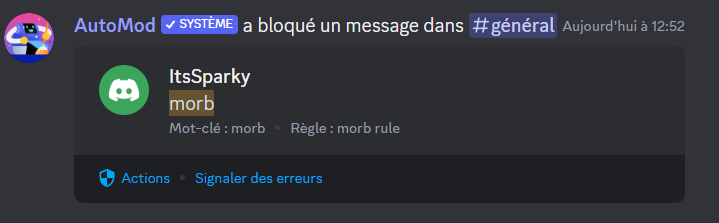
This is useful for tracking violations without automatically blocking them.
Timeout Member
Section titled “Timeout Member”Temporarily restricts the user from sending messages:
create a new automod rule and store it in {_rule}:    set type of rule to (message with mention filter 10 named "Excessive Mentions")
    add timeout member for 2 hours to responses of rule
Result: The user is timed out:

You can use any time span: seconds, minutes, hours, or days.
Creating Rules
Section titled “Creating Rules”The complete process involves creating the rule, setting its trigger, adding actions, and deploying it to a guild.
Basic Rule Creation
Section titled “Basic Rule Creation”create a new automod rule and store it in {_rule}: # Set the trigger set type of rule to (message with keyword filter "badword" named "Profanity Filter")
# Add actions add block message with "Please keep chat family-friendly" to responses of rule add send alert in channel with id "987654321" to responses of rule
# Deploy to guildcreate rule {_rule} in guild with id "YOUR_GUILD_ID"Practical Examples
Section titled “Practical Examples”Profanity Filter
Section titled “Profanity Filter”define bot MyBot: on guild ready: create a new automod rule and store it in {_rule}: set type of rule to (message with keyword filter "badword1 badword2 badword3" named "Profanity Filter")
add block message with "Watch your language!" to responses of rule add send alert in channel with id "MOD_CHANNEL_ID" to responses of rule
create rule {_rule} in event-guildAnti-Spam System
Section titled “Anti-Spam System”define bot MyBot: on guild ready: create a new automod rule and store it in {_rule}: set type of rule to (message with mention filter 8 named "Mention Spam Protection")
add block message with "Too many mentions! Please don't spam." to responses of rule add timeout member for 5 minutes to responses of rule add send alert in channel with id "MOD_CHANNEL_ID" to responses of rule
create rule {_rule} in event-guildScam Link Detection
Section titled “Scam Link Detection”define bot MyBot: on guild ready: create a new automod rule and store it in {_rule}: # Pattern matches common scam link patterns set type of rule to (message with pattern filter "free-?nitro|steam-?gifts|discord-?nitro" named "Scam Link Detection")
add block message with "This appears to be a scam link!" to responses of rule add timeout member for 1 hour to responses of rule add send alert in channel with id "MOD_CHANNEL_ID" to responses of rule
create rule {_rule} in event-guildMulti-Action Moderation
Section titled “Multi-Action Moderation”define bot MyBot: on guild ready: # Create multiple rules for different scenarios
# Rule 1: Severe violations - instant timeout create a new automod rule and store it in {_severe}: set type of rule to (message with keyword filter "extremeword" named "Severe Content Filter") add block message with "Severe violation detected" to responses of rule add timeout member for 24 hours to responses of rule add send alert in channel with id "MOD_CHANNEL_ID" to responses of rule
create rule {_severe} in event-guild
# Rule 2: Minor violations - warning only create a new automod rule and store it in {_minor}: set type of rule to (message with keyword filter "minorword" named "Minor Content Filter") add block message with "Please avoid this language" to responses of rule add send alert in channel with id "MOD_CHANNEL_ID" to responses of rule
create rule {_minor} in event-guildConfigurable Rules
Section titled “Configurable Rules”define bot MyBot: on guild ready: # Load settings from variables or config set {_modChannel} to "123456789" set {_maxMentions} to 5 set {_timeoutDuration} to 10 minutes
create a new automod rule and store it in {_rule}: set type of rule to (message with mention filter {_maxMentions} named "Mention Limit") add block message to responses of rule add timeout member for {_timeoutDuration} to responses of rule add send alert in channel with id {_modChannel} to responses of rule
create rule {_rule} in event-guildBest Practices
Section titled “Best Practices”-
Start Permissive
Begin with alerts only, observe patterns, then add blocking/timeouts as needed.
-
Clear Reasons
Always include helpful reason messages so users understand what they did wrong.
-
Alert Moderators
Include alert actions so your mod team can review AutoMod decisions.
-
Test Thoroughly
Test rules in a private channel before deploying to your whole server.
-
Layer Actions
Combine multiple actions: block message + alert moderators + timeout for repeat offenders.
-
Use Appropriate Timeouts
Start with short timeouts (5-10 minutes) for minor issues, longer for serious violations.
-
Update Regularly
Add new patterns as you discover new spam/scam tactics.
Rule Management
Section titled “Rule Management”Updating Rules
Section titled “Updating Rules”To update a rule, delete the old one and create a new one:
# First, manually delete the old rule in Discord's Server Settings > AutoMod# Then create the updated rulecreate a new automod rule and store it in {_newRule}:    # ... updated configuration ...
create rule {_newRule} in event-guild
Multiple Rules
Section titled “Multiple Rules”You can create multiple rules that work together:
on guild ready:    # Rule 1: Keyword filter    create a new automod rule and store it in {_keywords}:        set type of rule to (message with keyword filter "word1 word2" named "Keywords")        add block message to responses of rule    create rule {_keywords} in event-guild
    # Rule 2: Mention spam    create a new automod rule and store it in {_mentions}:        set type of rule to (message with mention filter 5 named "Mentions")        add timeout member for 5 minutes to responses of rule    create rule {_mentions} in event-guild
    # Rule 3: Pattern filter    create a new automod rule and store it in {_patterns}:        set type of rule to (message with pattern filter "spam.*pattern" named "Patterns")        add block message to responses of rule        add send alert in channel with id "MOD_CHANNEL" to responses of rule    create rule {_patterns} in event-guild
Regex Tips
Section titled “Regex Tips”When using pattern filters, here are some helpful regex patterns:
# Match any digitsmessage with pattern filter "\\d+" named "Numbers"
# Match linksmessage with pattern filter "https?://[^\\s]+" named "Links"
# Match repeated characters (spam)message with pattern filter "(.)\\1{5,}" named "Character Spam"
# Case-insensitive matchmessage with pattern filter "(?i)badword" named "Case Insensitive"Troubleshooting
Section titled “Troubleshooting”Rule Not Working
Section titled “Rule Not Working”Problem: AutoMod rule doesn’t trigger.
Solutions:
- Verify the rule was created successfully (check Discord’s Server Settings > AutoMod)
- Test with exact keywords or patterns you configured
- Ensure your bot has proper permissions
- Check that the guild has AutoMod enabled
Actions Not Executing
Section titled “Actions Not Executing”Problem: Triggers work but actions don’t happen.
Solutions:
- Verify the bot has
MANAGE_GUILDandMODERATE_MEMBERSpermissions - Check the alert channel ID is correct
- Ensure timeout duration is valid (between 1 minute and 28 days)
- Confirm the guild allows AutoMod actions
False Positives
Section titled “False Positives”Problem: Rule blocks legitimate messages.
Solutions:
- Refine your keyword list to be more specific
- Use regex patterns for exact matching
- Lower the mention threshold if too aggressive
- Add exemptions in Discord’s AutoMod settings
Missing Alerts
Section titled “Missing Alerts”Problem: Not receiving alerts in the designated channel.
Solutions:
- Verify the channel ID is correct
- Ensure the bot can send messages in that channel
- Check channel permissions
- Confirm the alert action was added to the rule
AutoMod Limits
Section titled “AutoMod Limits”- Active rules per guild: 10 maximum
- Keywords per rule: 1000 maximum
- Regex patterns per rule: 10 maximum
- Actions per rule: 5 maximum (currently 3 supported types)
- Timeout duration: 1 minute to 28 days
Next Steps
Section titled “Next Steps”- Set up Audit Logs to track all moderation actions
- Create Welcome Screens for new members
- Learn about Forums for organized discussions
- Explore Error Handling for robust bots